Note
Go to the end to download the full example code.
Contrast-to-Noise Ratio (CNR) Metric#
This example demonstrates how to:
Load an ultrasound dataset
Choose ROI selection mode (interactive or hardcoded)
Visualize the B-mode image and select signal/noise ROIs
Print ROI summary and statistics
Compute and print the CNR
This workflow is backend-agnostic and uses the helper functions from ultrasound_metrics. The CNR metric follows the formulation in [1] and uses the PICMUS dataset [2].
References#
Example#
1. Import required modules and functions#
import matplotlib.pyplot as plt
import numpy as np

from ultrasound_metrics.data import db_zero
from ultrasound_metrics.interactive.napari_utils import load_ultrasound_for_napari, select_rois_with_labels
from ultrasound_metrics.metrics.cnr import compute_cnr
from ultrasound_metrics.roi.masks import build_mask
2. Set ROI selection mode (interactive or non-interactive)#
def is_headless_environment():
    """Detect if running in headless environment (no GUI available)."""
    import os
    import sys

    # Check for ReadTheDocs
    if os.environ.get("READTHEDOCS") == "True":
        return True

    # Check for sphinx-gallery module
    return "sphinx_gallery" in sys.modules


# Interactive if not headless (feel free to change to True / False for local testing)
use_interactive = not is_headless_environment()
3. Load the ultrasound dataset#
image_data, metadata, scan = load_ultrasound_for_napari("picmus_resolution_experiment")
Downloading PICMUS_experiment_resolution_distortion.uff:   0%|          | 0.00/146M [00:00<?, ?B/s]
Downloading PICMUS_experiment_resolution_distortion.uff:   1%|          | 1.05M/146M [00:00<00:28, 5.02MB/s]
Downloading PICMUS_experiment_resolution_distortion.uff:   5%|▌         | 7.34M/146M [00:00<00:04, 27.9MB/s]
Downloading PICMUS_experiment_resolution_distortion.uff:  12%|█▏        | 16.8M/146M [00:00<00:02, 51.4MB/s]
Downloading PICMUS_experiment_resolution_distortion.uff:  19%|█▉        | 28.3M/146M [00:00<00:01, 72.1MB/s]
Downloading PICMUS_experiment_resolution_distortion.uff:  26%|██▌       | 37.7M/146M [00:00<00:01, 78.5MB/s]
Downloading PICMUS_experiment_resolution_distortion.uff:  32%|███▏      | 47.2M/146M [00:00<00:01, 83.3MB/s]
Downloading PICMUS_experiment_resolution_distortion.uff:  40%|███▉      | 57.7M/146M [00:00<00:00, 88.9MB/s]
Downloading PICMUS_experiment_resolution_distortion.uff:  47%|████▋     | 68.2M/146M [00:00<00:00, 93.4MB/s]
Downloading PICMUS_experiment_resolution_distortion.uff:  54%|█████▍    | 78.6M/146M [00:01<00:00, 92.6MB/s]
Downloading PICMUS_experiment_resolution_distortion.uff:  61%|██████    | 88.1M/146M [00:01<00:00, 92.1MB/s]
Downloading PICMUS_experiment_resolution_distortion.uff:  68%|██████▊   | 98.6M/146M [00:01<00:00, 92.2MB/s]
Downloading PICMUS_experiment_resolution_distortion.uff:  75%|███████▍  | 109M/146M [00:01<00:00, 93.8MB/s]
Downloading PICMUS_experiment_resolution_distortion.uff:  83%|████████▎ | 121M/146M [00:01<00:00, 98.9MB/s]
Downloading PICMUS_experiment_resolution_distortion.uff:  90%|█████████ | 131M/146M [00:01<00:00, 97.6MB/s]
Downloading PICMUS_experiment_resolution_distortion.uff:  97%|█████████▋| 142M/146M [00:01<00:00, 95.3MB/s]
Downloading PICMUS_experiment_resolution_distortion.uff: 100%|██████████| 146M/146M [00:01<00:00, 83.5MB/s]
4. Visualize the B-mode image to help select ROI center and radii#
x_coords = metadata["x_axis"]
z_coords = metadata["z_axis"]

# Only convert to dB if not already in dB scale
if metadata.get("use_db_scale", True):
    image_db = image_data
else:
    image_db = db_zero(image_data)

if not use_interactive:
    plt.figure(figsize=(7, 7))
    plt.imshow(
        image_db,
        cmap="gray",
        aspect="equal",
        vmin=-60,
        vmax=0,
        extent=[x_coords.min(), x_coords.max(), z_coords.max(), z_coords.min()],
    )
    plt.title("B-mode (dB scale)\nNormalized to 0dB")
    plt.xlabel("Lateral Position (m)")
    plt.ylabel("Axial Position (m)")
    plt.colorbar(label="dB")
    plt.show()
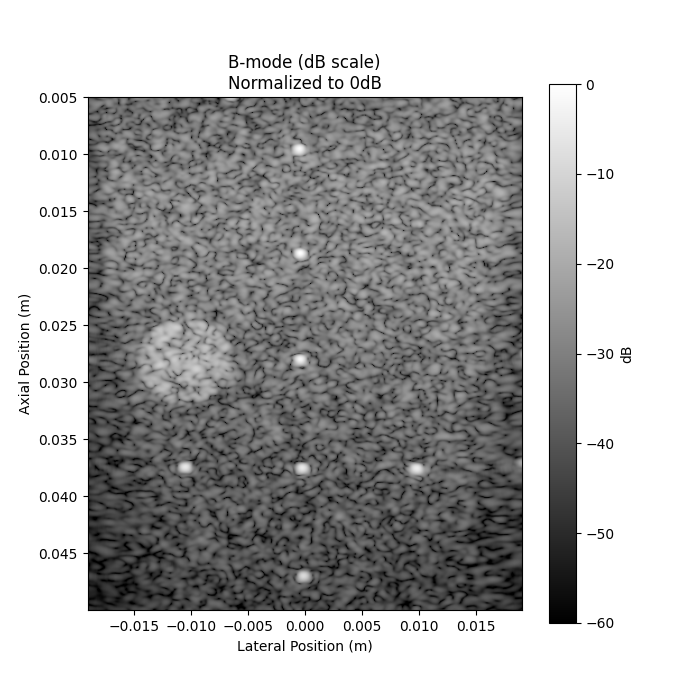
5. Select ROIs (either interactively or with hardcoded masks)#
if use_interactive:
    roi_result = select_rois_with_labels(image=image_data)
    mask_signal = roi_result["mask_signal"]
    mask_noise = roi_result["mask_noise"]
else:
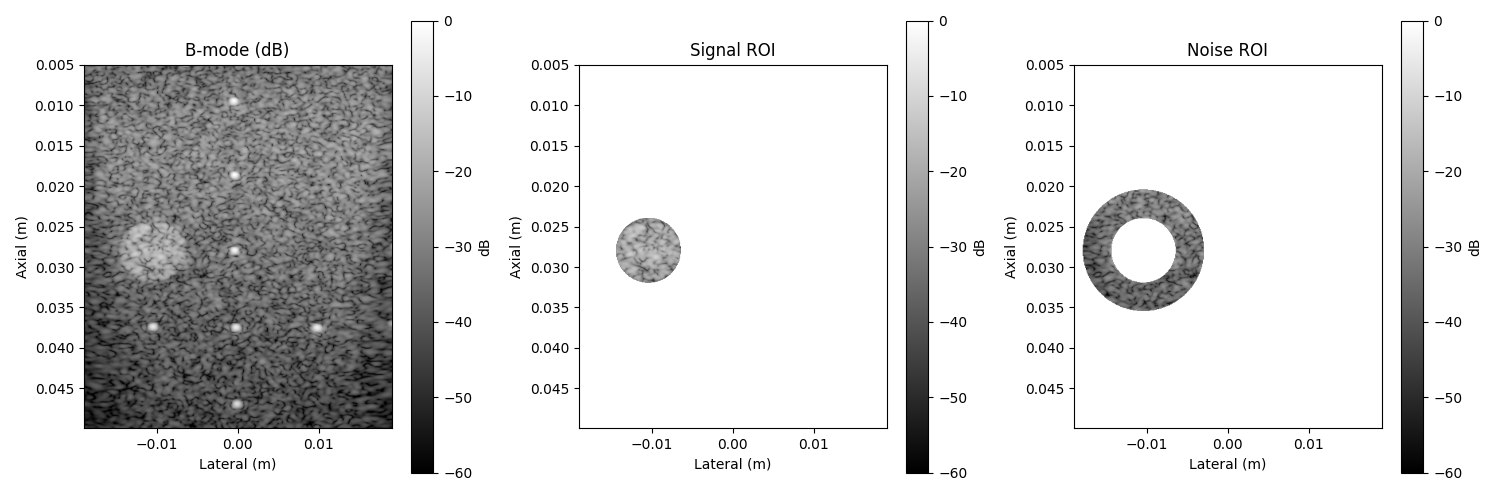
    # Hardcoded ROI selection and visualization
    center = (-0.0105, 0.028)  # (x, z) in meters
    signal_radius = 0.004  # 4 mm
    noise_radius = 0.0075  # 7.5 mm
    mask_signal = build_mask(
        position=center, dimension=signal_radius, x_axis=metadata["x_axis"], z_axis=metadata["z_axis"], shape="circle"
    )
    mask_noise_outer = build_mask(
        position=center, dimension=noise_radius, x_axis=metadata["x_axis"], z_axis=metadata["z_axis"], shape="circle"
    )
    mask_noise = np.logical_and(mask_noise_outer, ~mask_signal)
    # --- Visualization of B-mode, signal, and noise masks ---
    fig, axs = plt.subplots(1, 3, figsize=(15, 5))
    bmode_args = {
        "extent": [x_coords.min(), x_coords.max(), z_coords.max(), z_coords.min()],
        "cmap": "gray",
        "vmin": -60,
        "vmax": 0,
    }
    im0 = axs[0].imshow(image_db, **bmode_args)
    axs[0].set_title("B-mode (dB)")
    axs[0].set_xlabel("Lateral (m)")
    axs[0].set_ylabel("Axial (m)")
    fig.colorbar(im0, ax=axs[0], orientation="vertical", label="dB")
    masked_signal = np.ma.masked_where(~mask_signal, image_db)
    im1 = axs[1].imshow(masked_signal, **bmode_args)
    axs[1].set_title("Signal ROI")
    axs[1].set_xlabel("Lateral (m)")
    axs[1].set_ylabel("Axial (m)")
    fig.colorbar(im1, ax=axs[1], orientation="vertical", label="dB")
    masked_noise = np.ma.masked_where(~mask_noise, image_db)
    im2 = axs[2].imshow(masked_noise, **bmode_args)
    axs[2].set_title("Noise ROI")
    axs[2].set_xlabel("Lateral (m)")
    axs[2].set_ylabel("Axial (m)")
    fig.colorbar(im2, ax=axs[2], orientation="vertical", label="dB")
    plt.tight_layout()
    plt.show()
6. Print ROI summary#
signal_pixels = mask_signal.sum()
noise_pixels = mask_noise.sum()
print("\n=== ROI Selection Summary ===")
print(f"Signal region pixels: {signal_pixels}")
print(f"Noise region pixels: {noise_pixels}")
=== ROI Selection Summary ===
Signal region pixels: 6895
Noise region pixels: 17361
7. Print basic statistics#
values_signal = image_data[mask_signal]
values_noise = image_data[mask_noise]
print("\n=== Region Statistics ===")
print(f"Signal mean: {values_signal.mean():.3f} dB")
print(f"Noise mean: {values_noise.mean():.3f} dB")
=== Region Statistics ===
Signal mean: -23.187 dB
Noise mean: -35.079 dB
8. Convert from dB to linear scale for CNR calculation#
values_signal_linear = 10 ** (values_signal / 20)
values_noise_linear = 10 ** (values_noise / 20)
9. Compute and print CNR#
cnr_value = compute_cnr(values_signal_linear, values_noise_linear)
print("\n=== CNR Results ===")
print(f"CNR: {cnr_value:.3f}")
=== CNR Results ===
CNR: 0.853
Total running time of the script: (0 minutes 2.694 seconds)